

Complete your setup
Everything this camera needs, matched by our specialists. Silarius picks first.
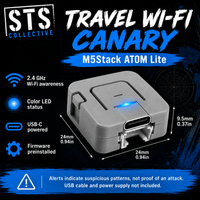
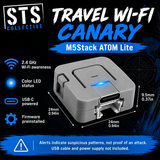
A compact, USB-powered awareness tool for unusual activity on nearby 2.4 GHz Wi-Fi networks. Travel Wi-Fi Canary runs STS's open-source ESP32 firmware on the M5Stack ATOM Lite and uses a color LED to show its current alert score.
Included and required
- One M5Stack ATOM Lite with Travel Wi-Fi Canary firmware installed.
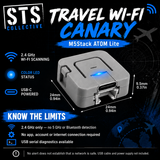
- Requires USB-C power. USB cable and power supply are not included.
- No app, account, internet connection, or additional sensor module is required for LED operation.
- No built-in battery, display, or audible alarm.
What it monitors
The firmware uses nearby access-point scans and selected Wi-Fi management frames to flag patterns such as deauthentication/disassociation bursts, probe-request floods, and network-name or security changes. These are heuristic indicators that require interpretation, not proof of an attack or identification of a specific device.
Getting started
- Connect USB-C power in the location you want to observe.
- Allow the initial three scans to learn the local network baseline. Startup takes longer than 24 seconds depending on scan duration.
- Watch the LED: blue during startup, green for a low score, yellow for caution, and pulsing red for a higher score. Cyan briefly indicates scanning.
- Power-cycle after moving to a new location to learn a new baseline.
For additional details, connect to USB serial at 115200 baud. Pressing the button prints the access-point table and resets the alert score; it does not relearn the baseline.
Know the limits
2.4 GHz Wi-Fi only. This firmware does not detect 5 GHz Wi-Fi, Bluetooth trackers, cellular activity, or hidden cameras generally. Monitoring samples channels and pauses during access-point scans; it cannot observe every frame. The current firmware performs active Wi-Fi scans. Alerts may have benign causes, and a green LED or absence of alerts does not establish that a network is safe. This device does not block attacks or secure your internet connection.
Project source and documentation: ESP32 Wi-Fi Canary.
Setup guides and downloads
Download your free PDF guide for setup, power requirements, troubleshooting and documentation links. Save a copy for offline reference.
Project documentation
Use the instructions for your exact hardware and installed firmware version. Setup help: support@stscollective.com.
Shipping
Free US shipping on orders over $200. Orders under $200 ship at the rate shown at checkout. Oversized items ship by freight; we confirm the quote with you first.
Shipping policyReturns
Return within 30 days of delivery. Opened items may carry an open-box fee of up to 30%, set by our QA team on inspection. Return shipping is paid by the customer.
Start a returnDamaged or wrong item?
Tell us within 3 days of delivery with photos and we'll make it right, with no fee.
Contact usSTS Technologies LLC warranty
This product is covered by the manufacturer's warranty. We help you with the claim from start to finish.
Warranty detailsSupport from real people
Setup questions, compatibility, firmware: chat with a specialist or email info@silarius.com, Monday to Friday, 8am to 4pm ET.
Chat with usBusiness accounts
Approved businesses can pay on Net 30 / PO terms after their second completed order.
Ask about terms
Frequently bought together
Save money buying these products together